YouTube today isn’t just about vloggers with cameras — many creators earn views and revenue without ever showing their faces. Thanks to script to video ai tools, producing content that rivals traditional videos in quality has become easier and faster. Whether it’s voice-over explanations, animated explainers, narrated stories, or trending clips for Shorts and Reels, AI can automate large parts of the creation process.
In this blog, we’ll walk you through a step-by-step approach to building a faceless YouTube channel using script to video ai, including how to write scripts, choose visuals, generate voiceovers, edit, optimize for SEO, and publish daily or weekly. We’ll also list the 5 best script to video ai tools to help you scale without expensive production gear.
Why Faceless Channels Are So Popular
Faceless YouTube channels — those that don’t show the creator’s face — have exploded in popularity because:
- Lower production costs: No camera crew, lighting, or studio setup required.
- Faster turnaround: Automation speeds up content creation.
- Wide content variety: Educational, listicles, narration-based news, animations, explainers, and more work well without a face.
- Audience focus: Viewers engage with the topic, not the presenter.
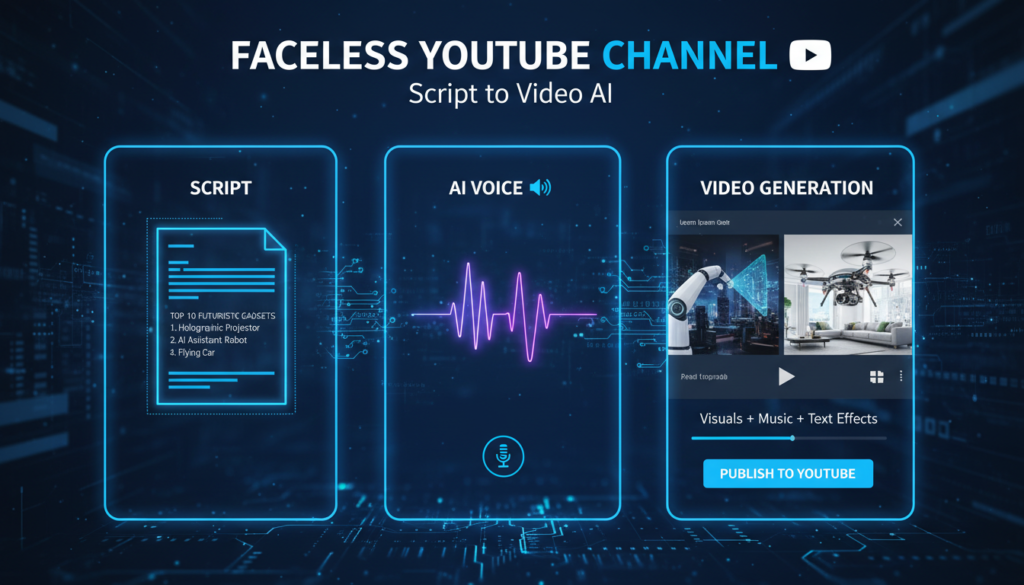
Traditionally, building this type of channel required manual editing, footage sourcing, and voice recording. With script to video ai, you can now generate entire videos from a written script in minutes — including visuals, narration, subtitles, and transitions — making it possible even with minimal experience.
Step-by-Step: Build Your Faceless Channel
1. Choose Your Niche and Audience
Start by picking a niche where faceless content performs well. Some popular examples include:
- Tech explainers
- Trending news summaries
- Animated history or fun facts
- Motivational lists
- Product reviews
Understand your audience’s pain points and preferences. This affects your script tone, length, and visuals.
2. Write Your Script
Your script forms the backbone of every video. Good scripts have:
- A strong hook: Grab attention in the first 5–10 seconds.
- Clear sections: Break video into logical parts.
- Concise language: Keep sentences short and direct.
- Call to action: Ask viewers to like, comment, subscribe.
Tools like AI text assistants can help generate scripts based on topic prompts, saving hours of brainpower.
3. Use Script to Video AI Tools to Generate Your Video
Here’s where script to video ai tools do most of the heavy lifting. Instead of recording footage or cutting clips manually, you simply paste your script into an AI tool — and it generates video scenes, adds voiceovers, subtitles, music, and pacing.
Many of these tools act like an ai video generator app, letting you create publish-ready videos fast without advanced editing knowledge.
Best Script to Video AI Tools
Each of these tools turns scripts into finished videos, but they differ slightly in focus and workflow.
1. Invideo – Script to Video AI Tool
Description: Invideo’s script to video ai lets you create full videos directly from your script. You paste your script or text into the workflow, choose voiceover settings and styles, and Invideo’s AI analyzes each line to build scenes, match visuals, and sync narration. It also adds text overlays that highlight key points from your script.
Best for: Creators who want professional, publish-ready videos with visual AI assistance.
Key Capabilities:
- Convert scripts to video in minutes by entering text prompt.
- Syncs AI-generated voiceovers to visuals.
- Automatically selects visuals relevant to script content.
- Adds text overlays that emphasize key phrases.
- Multiple voice options and pacing settings.
2. Wavel AI – Script to Video Generator
Description: Wavel AI lets you input a written script and instantly generate a full video with visuals, subtitles, music, and voiceover. The tool supports a range of video types — from explainers to social clips — and handles captioning automatically.
Best for: Content designers who want automatic voice and subtitle integration.
Key Capabilities:
- Paste a script to generate the complete video.
- Offers voice selections across languages and styles.
- Auto-adds subtitles based on script content.
- Includes background music and visual picks.
3. Hooked – Script to Video AI Tool
Description: Hooked automatically analyzes your full script, breaks it into logical scenes, and generates visuals and AI narration to match. Its contextual visual generation selects scenes that reflect the content in each section of your script.
Best for: Videos with scene segmentation and multi-voice narration needs.
Key Capabilities:
- Intelligent script analysis for structured videos.
- Auto scene segmentation based on pacing and tone.
- Support for multiple AI voice options in different languages.
- Generates final videos ready for social upload.
4. Kapwing – Script to AI Video Tool
Description: Kapwing’s script-to-video feature lets you generate clips from your script and edit them using an intuitive editor. While it comes with built-in text editing and dubbing functions, its AI features help with voiceover generation and automatic subtitle creation.
Best for: Creators looking for quick edits and multilingual options.
Key Capabilities:
- Convert scripts into videos with AI voiceover.
- Add automatic subtitles and translations.
- Edit the result with intuitive controls.
- Resize and optimize videos for different platforms.
5. Jogg AI – Script to Video Maker
Description: Jogg AI lets you paste scripts, select characters or presenters, choose voiceovers, and render the full video with music and captions. Its focus is on simplicity — you can go from script to export in minutes.
Best for: Quick script-to-video conversions without technical complication.
Key Capabilities:
- Simple script input and render workflow.
- AI-generated voiceover and stylized visuals.
- Subtitle generation and music integration.
- One-click export for publishing.
4. Select and Customize Visuals
Even though AI generates visuals, it’s worth refining the output:
- Replace or adjust visuals that feel irrelevant.
- Align colors and fonts with your channel’s look.
- Add icons or motion to keep viewer’s interest.
- Add branded intro/outro segments.
Customization ensures your videos look polished and consistent.
5. Add Voiceovers and Subtitles
Voiceovers and captions matter especially on YouTube Shorts and long videos alike:
- Choose a voice style that matches your niche: serious, energetic, calm.
- Use subtitles for accessibility and watch-time boosts.
- Review automated captions — correct errors manually before publishing.
Tools listed above typically offer built-in voice and subtitle generation.
6. Upload and Optimize for SEO
Publishing is only half the battle; optimization drives views.
- Write keyword-rich titles and descriptions.
- Include script to video ai in your description where relevant.
- Add chapters or section markers for longer videos.
- Use compelling thumbnails to draw clicks.
- Add hashtags relevant to your niche and trending topics.
7. Analyze and Iterate
Post-publication:
- Track watch time, retention, and click-through rate (CTR).
- Use analytics to refine hooks, pacing, and script style.
- Test variations: shorter scripts, different voiceovers, or pacing.
With each video, your AI workflow becomes smoother and more refined.
Final Thoughts
Faceless YouTube channels offer a scalable, efficient way to create content without filming yourself or hiring a crew. With modern script to video ai tools — including tools that function as an ai video generator app — you can generate quality content in minutes rather than days.
By focusing on compelling scripts, choosing the right tool, customizing intelligently, optimizing for SEO, and analyzing performance, you set your channel up for consistent growth. These tools don’t replace creativity — they accelerate it, helping you produce content that keeps your audience coming back for more.